Smart Devices as a Digital Life Coaches

The world is changing and in many great ways. As mobile devises become more powerful, their functionality has extended beyond simply sending emails, text messages and phone calls (yes, the order was intentional). The latest advance, and you will see this popping up everywhere are what I would like to call “Digital Life Coaches”.

Imagine having your dietitian, personal trainer, GPS (in some cases), sleep therapist, and alarm clock with you your 24/7. With devices like Lark’s larklife (http://www.lark.com) , or the Nike+ Fuelband (http://www.nike.com/ca/en_ca/lp/nikeplusfuelband) you can. Starting around $125 you get to wear a stylish wristband (how dare we call it a bracelet, as we may offend the occasional man), that digitally monitors many aspects of our lives.

Most of the bands work very similar and are based around an accelerometer and software on your computer, online or your smartphone; here is a quick rundown on the Nike Fuleband and LarkLife.

NIKE+ FUELBAND

The Nike+ Fuelband tracks your all-day activity to help you do more.  Here is a quick overview of the Fuelbands key features:

TRACK YOUR DAY: Through a sports-tested accelerometer, Nike+ FuelBand tracks your daily activity including running, walking, basketball, dancing – and dozens of everyday activity. It tracks each step taken and calorie burned. It also tells the time of day [a neat feature].

SET A DAILY GOAL: Decide how active you want to be by setting a daily NikeFuel goal. The band’s LED display lights up from red to green showing your progress throughout the day.

SEE YOUR PROGRESS: Visualize your daily activity to see when you’re most active – and when you’re not. Nike+ helps you understand your activity patterns to help you do more. Progress is available online or via a smart phone such as the Apple iPhone.

STAY MOTIVATED: Receive achievements and rewards as you do more. Get on a streak, exceed your goal, and hit milestones along the way, and tell the world by sharing your activity and achievements through Facebook, Twitter and Path [interesting, I am not familiar with Path, will need to check it out!]

Overall, my impressions with Nike+ Fuelband is that it is catered more to active, physical fitness over every day personal life balance.  That is where larklife takes over.

LARKLIFE

I have been interested in Lark for a while now when I first got wind of their Lark Pro – Personal Sleep Coach that silently wakes you through a vibrating alarm clock. The Pro version, includes a sleep coach that monitors information like length of sleep, time, and patterns, to help improve your sleeping patterns. Lark has expanded its lineup to provide 24 hour life coaching with their LarkLife. Lark’s LarkLife is your all-in-one exercise, diet and sleep coach. LarkLife monitors your daily activity to help you: exercise smarter – Tap into your optimal exercise time and make your workout work for you; eat smarter – Get insight about what to eat and when, so you feel more energized and keep a healthy weight; sleep smarter – Improve your sleep and wake up more refreshed without bugging your sleeping partner; energize smarter – Pick up your productivity at work and at home with tips on how to focus and feel energized.

Some very cool features in the LarkLife include:

MOVE:

  • Step / Distance Tracking: At the end of the day, you’ll know how far you’ve gone, how sedentary you’ve been, how each day compares to the last, and how that compares to the average person, so you can make improvements the next day.
  • Exercise Logging: Easily keep track of the type of exercise, the amount of time you spent doing it, the distance you covered, the calories you burned and when you started and stopped. Larklife is so smart, it can even tell if you went for a walk or run and will log it for you automatically, so you can compare activity and calories burned across different exercises.
  • Calories Burned: See how many calories you’re burning based on your activity each day. Since managing calorie use is important to maintaining focus, mood and productivity, Larklife helps you modify your thinking and behavior around being more active.
  • Fitness Alerts: Get a nudge to move if you’ve been inactive for a while. Larklife makes it easier to stick to a fitness routine with alerts that help you stay on track, as well as find ways to squeeze more movement into your day.
  • Expert Fitness Coaching: Developed with top experts who coach pro athletes and business executives, Larklife’s activity tips reinforce positive behaviors and help you to learn new ones to incorporate into your daily routine. By getting more consistent, effective activity each day, you’ll notice improvement in your energy levels and your health.

EAT:

  • ONE BUTTON DIET LOGGING: Log meals with the press of the button and pick the food group it belongs in. The simple diet logging helps you keep track of your meals and snacks to keep your energy up and work toward a healthy weight.
  • HYDRATION TRACKING: Easily track your daily water intake. With just one tap, you can log a serving of water. larklife helps you track the water you drink and reminds you to have a glass when it looks like you haven’t had enough, so you can get the most out of your exercise and your
  • MEAL ALERTS & REMINDERS: Easily track your daily water intake. With just one tap, you can log a serving of water. larklife helps you track the water you drink and reminds you to have a glass when it looks like you haven’t had enough, so you can get the most out of your exercise and your
  • EXPERT NUTRITION COACHING: Meal tips are designed by top nutrition experts. Learn about the super foods and eating habits that help you maintain a healthy weight and stay energized throughout the day. The smart accelerometer in the sensor tracks your daily activity level, which larklife translates into expert nutrition coaching for your optimal meal times and the types of foods you should eat.

SLEEP:

  • SLEEP TRACKING: At night, the smart accelerometer becomes a comfortable sleep sensor that determines your sleep duration and quality, as well as when you’re falling asleep, awake or tossing and turning. Getting good quality sleep is the foundation of energy and the key to maintaining focus during the day.’
  • ACTIGRAPHY: Used widely by sleep clinics to track sleep quality based on activity, actigraphy tracks millions of micro-movements every minute, and then calculates exactly how long and how well you’ve slept. Developed with Stanford sleep specialist, Cheri Mah, larklife shows you the changes you can make to sleep better.
  • SILENT ALARM CLOCK: Dynamic vibration patterns gently nudge you awake while others around you sleep. Gentle vibration can reduce heart rate variability, stress levels and blood pressure spikes—all of which are known to cause that groggy feeling in the morning. Great for couples, roommates, the hard of hearing and deep sleepers.
  • SLEEP ALERTS AND REMINDERS: It can be hard to keep a consistent bedtime, no matter how good it is for you. Get recommendations for when to head to bed in order to sleep better and feel your best the next day.
  • SLEEP COACHING: Stanford sleep specialist, Cheri Mah, developed expert sleep tips to give you advice and encouragement that helps you stick to a consistent sleep schedule and a high quality of sleep. Discover the little triggers you may not have known about that make a big impact on how you sleep at night and how you feel the next day.

REFRESH:

  • Productivity Break: Timing breaks can help you get a fresh perspective and actually make you more productive when you get back to work. Larklife recommends when and how to spend your break to get back feeling refreshed.
  • EXPERT PRODUCTIVITY COACHING: Refresh tips use expert-based guidance to help you to discover the things that add more energy to your day. Whether it’s a new hobby or a phone call with an old friend, Larklife knows that energy and wellness come from more than just the physical. Increasing your productivity starts with feeling more refreshed.

SUMMARY

As both products rely extensively on supplementary software to provide your results, which affords both companies a huge advantage of being able to implement new and interesting features  without the need for fancy hardware upgrades. Through a simple iPhone update or website enhancement, as examples, new features could be added to either device. Overall, both products look very cool; however as I need to spend my own money to test them out, it is still a tough call which I am going to buy. The Nike FuelBand looks cool, the LED screen is a very nice touch and almost had me sold with the “coolness” alone. However, Lark, and especially the sleep coaching has held my interest for a while.
Google Glass – What to expect?

Once the exclusive domain of science fiction writers, glasses that allow you to display data, take photos and videos, translate real-time speech and even identify faces in a crowd have become a reality thanks to Google Glass. While rumors have been around for several years now, not many believed that this new piece of hardware would have found its way to developers quite so soon. Indeed, the first versions of Google Glass have already been purchased by developers at a cost of around $1,500 a pair. So what exactly can we expect from this new technology: a revolutionary step forward or a mere gimmick?

What is it?

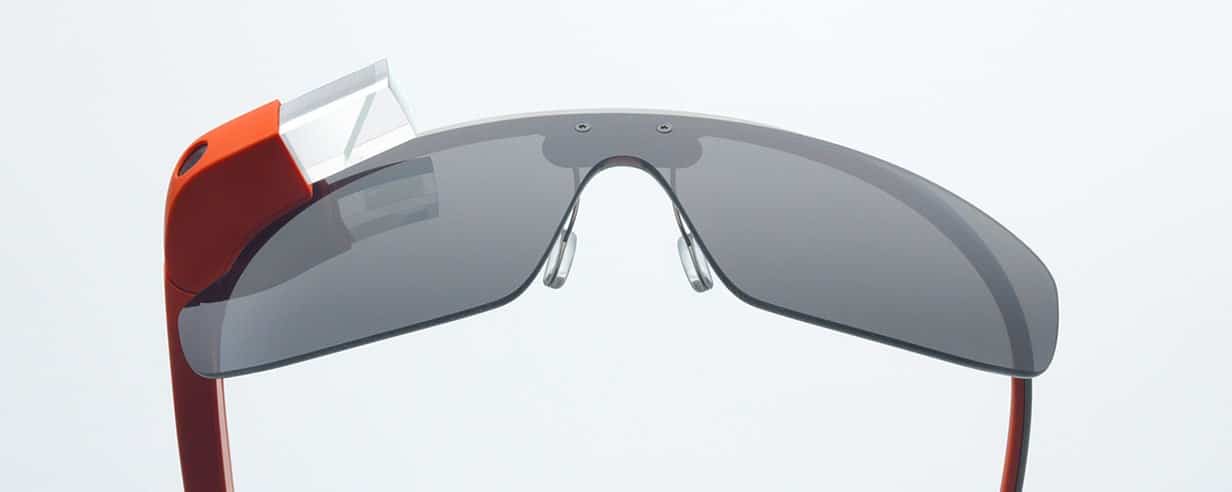
Google Glass is Google’s attempt to move data from traditional desktop computers and mobile devices to a prism screen that sits right at the end of your nose. Comprised of a display, touchpad, camera, battery and microphone, Google’s glasses will allow users to display data, take photographs and videos, and search while on the move.

How does it work?

Google Glass puts data into the upper right-hand corner of your field of vision using a prism screen. This placement is intended to be readable while not obstructing normal vision. The embedded microphone allows wearers to use voice commands to control what they see, with the side arm touchpad further facilitating navigation. Bone-induction technology, the presence of which has been confirmed, will also eliminate the need for headphones, as wearers will have sound transmitted directly to their ears through vibrations.

Google is also developing several other versions of the technology, for example by integrating prescription lenses into the design so that wearers of corrective glasses may also make use of the product. According to rumours mentioned in New York Times article Google has been talking with some eyeglasses retailers and manufacturers, which appears logic: and a deal with the likes of industry giant Luxottica would definitely boost both companies’ market-share and assure Google’s new product better look and alternative form of distribution.

What will it be used for?

Among the many potential uses of Google Glass is the possibility of translating or transcribing what is being said in real-time, potentially eliminating the need for minute taking and interpreting. Similarly, users can take real-time photographs or video footage of what they see from a first-person perspective; though this has prompted alarm from those who view this secret agent style filming technique as a potentially harmful breach of privacy.

Using the MyGlass app, users can also pair their glasses with their Android device, thus giving them the ability to read and reply to messages using the Google Glass voice-to-text software. If the glasses are paired with a GPS device, directions should become integrated with users’ vision such that following them becomes an intuitive process.

App developers have understandably grown excited about this new technology and are creating a myriad of new apps to complement it. From face recognition software and e-mail dictation technology to real-time flight information and newspaper headline apps, the sky really seems to be the limit.

When will it be on the market?

Though no official release date has been announced, some believe that Google Glass will be available to consumers by the end of 2013. Though the present cost to developers is around $1,500, the consumer version is expected to be cheaper.

Review: Larklife by Lark Technologies (My First Impressions)

Here is my review of my first impressions about my new Larklife by Lark Technologies (www.lark.com) which is a new breed to Personal Life Coach that may help revolutionize our work – life balance; or so I hope.  Excited to try this new technology, my pre-ordered Larklife arrived in the mail earlier today by UPS.  Although, originally promised by Christmas 2012 – in Lark’s defense, the shipping label was printed December 21st, and informed customers that had pre-ordered their newest product on December 23rd that “Due to a combination of manufacturing delays, high demand, and shipping snafus we are unable to deliver your order…”.  That being said, it is here now, so time to give it a whirl.

For those that did not have a chance to read my post commenting on larklife and Nike+ Fuelband, here is a quick peak at what larklife can do.

Larklife will track your activities during the day and your sleep quality at night while syncing your data automatically with your mobile device. During the day, larklife alerts you when you’ve achieved small wins – the little things in your day that make a positive impact on your health, energy and focus. Remember to check back into your larklife app throughout the day to see what you did!

Tony Caselli (tonycaselli.wordpress.com) commented on our blog a few weeks ago on his first insights into his new Larklife.  One point that Tony mentioned what that the larklife was ” a little larger than I’d expected, but not awkwardly large – it just doesn’t have the “cool jewelry” look of the Fuelband.  I do like that it does more than the Fuelband, in terms of sleep and water and food tracking.  It does have an led “meter” display, but I’d love it if could double as a watch also!”.  My first impressions is that I have to agree, it is a little wider then I had anticipated from the original production pictures on Lark’s website, however as Tony commented, not awkwardly large.  Overall it is about an inch wide on the front face and 3/4 of an inch on the bottom of the rigid band.  Mine fits snugly (medium) – and may keep my eyes open on Lark’s website for a replacement band and see how a large may fit, although larger band may not fit as nicely under a dress shirt and my suit.

Documentation

My initial reaction was the lack of documentation included with the larklife was a little disappointing which was limited to how to setup and sync your band with your iSomething device.  As examples, there is a small button that runs the length of the larklife sensor and series of 8 LED lights along the top of the sensor, however I could not tell you exactly what either is for.  Well I took a pause from my article after it occurred to me that the iOS larklife application had a few video tutorials as part of the setup.  In Larks defense, my eager beaver self, downloaded and installed the app a few weeks ago and had completely forgot.  In addition, I found a nice eight page manual on the larklife website at the following link:  http://support.lark.com/entries/21432948-lark-user-manual or the PDF can be downloaded directly here.

iOS App

The application is version 1.1 which shows the infancy of the application, at the same time, new and enhanced features have been introduced in the short life of larklife which first debuted in the iTunes store on November 13, 2012.  Some of the new features introduced to the application include:

  • New and improved tips, which appear as notifications if outside the app
  • Added Mood tagging features
  • Added syncing indicator for wristband in the blue circle
  • Performance improvements and bug fixes

Last night was my first night with the sleeping band, and was interesting to see its results — however a pause or “I need a glass of water” option would be helpful as my wander to the kitchen was counted as approximately 10 waking events.  It was interesting to see that it took me only eight minutes to fall asleep — not bad for 1:45 in the morning following New Years festivities.

What Features Would I Like to See

  • Replacement bands so that you can order a larger or smaller size
  • Better integration of the Lark and Lark Pro features into the App – we can wear two devices so make my larklife compatible
  • Ability to add custom reminders in the application; for example, when to take a daily vitamin
  • More reminders and better recognition of your habits
  • Diet or calorie  intake

How Dare you BBQ Without Fire in the Kitchen Spice Co | Christmas 6-Pack

0

Ever since we received the Fire in the Kitchen Spice Co. Christmas 6-Pack of their incredible seasoning rubs, they have become a staple to our barbequing.   It is time for a refill, myself. These rubs are simply the most outstanding dry rubs on the market today. Chicken, pork, beef, veggies and fish never tasted so good!

The Christmas Pack is a great way to sample some of their fantastic seasonings.  The Christmas 6-pack includes:

Six speciality seasonings for grilling, oven roasting, baking, broiling, smoking, steaming and pan-frying

One Rub

***THE PERFECT SEASONING FOR OVEN ROASTED TURKEY***

Chicken, chicken wings, pork, ribs, steak, venison, pasta, soups, salads, sandwiches, vegetables, BBQ sauces, dips, eggs
Fire Rub An all-purpose seasoning with some heat Steak, roasts, chicken, pork, ribs, venison, soups, BBQ sauces, dips, eggs

JJ’s Veggie Blaze

The perfect seasoning for all vegetables Asparagus, peppers, onions, broccoli, corn, potatoes, carrots, salad dressing, infused veggie butter, chicken.

T-Bone’s Smoke Eater

A true garlic and hickory smoke seasoning Roasts, steaks, ribs, pork, chicken, shrimp, pizza.

Big Angry’s 3 Alarm

Seasoning with intense heat and explosive flavour Chicken, chicken wings, steak, pork, ribs.

Captain Bradley’s Ocean Rub

An amazing spice blend created specifically for seafood Salmon, white fish, scallops, shrimp.

How to Order

Call or e-mail to place your order before December 15, 2012.

Christian@fireinthekitchen.ca ~ 647-200-0530 ~ Will deliver in the GTA!

Individual seasonings available, $6 each, minimum order of 2 – Great stocking stuffers!


Fire in the Kitchen has come a long way since I wrote this post in 2012. Most notably, most of their great rubs can be found at your local supermarket. Visit the Fire In The Kitchen website to find a location near you. As a long time supporter of the brand, I continue to stand by my comments five years later.

Guest Post: The Best Computer Accessories for a Home Computer

When one buys a computer one often doesn’t take into consideration the fact that you will need other devises for your computer. When you buy a computer you just get the basics, sometimes in order to make the computer fit into your life you’ll need to make a few extra purchases of computer accessories from Dell.

Some computer accessories that you might consider are:

  • Speakers
  • A carry case
  • Mouse
  • Stand
  • Heat Shield
  • An extra battery
  • Earphones

These things will make it easier for you to use your laptop at its most optimum level. Let’s go over the reasons for these purchases one at a time.

If you are going to use your laptop for entertainment purposes, you should get some speakers. The speakers that come on the laptop are frequently inadequate for listening to music or videos.

You’ll need a carry case for a laptop even if you don’t frequently travel with your computer. If you can put it away after every use, you’ll decrease the amount dust and decrease the opportunities for damage to your computers.

The track pad on a computer is effective; however, they’re not as easy to use as a traditional mouse. You can get a wireless mouse for just a few dollars. They usually have a small USB that fits into the port of your computer, and then it works just like any other mouse. This is convenient especially for those who work on their laptops.

If you spend most of the time on your laptop with it on your lap, you’ll need a heat shield. Although laptops don’t get extremely hot, it can get uncomfortable after a long time.

You may want to purchase an extra battery. Laptop batteries these days can last for a very long time, however, if you’re planning on travel, an extra battery can keep you working even on long trips.

Earphones are a must in my opinion. I can’t tell you how often I’ve had to work away from home and had problems focusing because of the conversations of people around me or because of other things that are happening. Even at home, if I’m listening to music, it’s easier to ignore the phone. So if you’re planning on using the computer for work, I suggest getting a set of earphones.

Laptops are great for those who are working from home, or even if you are using it as a personal computer. There are some things that will make it easier for you to enjoy your laptop.

When you go to the store, do some research, ask for advice; let them know what you’re looking for and what you’re going to lose your laptop for. An associate will be able to tell you what you need to know about which accessories you’re going to need.

Identifying Warning Signs of Excessive Debt

How do you know if you have too much debt? Learning about debt can help you determine if you have more than you should. The first step is to learn about and understand debt and just how it works. In this age of ‘buy now, pay later,’ the traps of debt are numerous.

There may be warning signs that you are incurring too much debt or are close to being in financial trouble. These warning signs may include:

  • Inability to make all of your monthly payments. If you are noticing that every month you are having troubles making all of your payments or are skipping one or more of them, you have a serious debt concern and it’s time to take drastic action.
  • Using credit cards each month immediately following making a payment. If you find that you are using a credit card as soon as you make a payment on it, this is a warning sign that you are living above your means.
  • Add up all of your debt and determine what portion of your income is going towards it. When you are spending more than 10% of your income on credit card and instalment loans this is a warning sign you could be facing financial hardship.

To calculate your total debt and understand just what your financial situation is, add up all of your monthly payments and divide this by your monthly income. Then take that number and time by 100. For instance, if you have credit card payments that equal $200, auto loans that equal $300, and student loans that equal $100, your total monthly debt is $600. If your total income each month is $2500 you would then divide $600 by $2500. This gives you a result of 0.24 then times by 100 equals 24%. This means that every month, almost one-fourth of your income is going just towards meeting the minimum payments on your loans.

If your total debt to income is at a ratio of over 40% you could be facing serious financial difficulty. In this situation, it’s important to take drastic action to work on reducing your debt. You may want to consider working with a professional with expertise in this area such as a debt management plan. Working with a financial advisor you can determine which debt reduction plan will work best for you. These options include considering a debt consolidation loan, creating a repayment plan, using a snowball effect, or even working with creditors to reduce payments and fees.

The important thing to remember when working to reduce your debt load is that you cannot accrue any more debt. You must first work on creating a realistic monthly budget that you can live by while using any additional funds towards reducing and finally eliminating unnecessary debt.

Guest Post | What is Carbohydrate?

Evidence Based Health Care:

Before I enter contentious territory I think it’s important to state my position on modern western medicine. I am under the care of a Gastroenterologist, Dr David Hetzel to manage Crohns disease and a Physician and Allergist Dr Alan Gale (www.agale.com.au) who I consult for management of insulin resistance.

I support Evidence based practice. Evidence based practice means that anything that health professionals tell us to do should be supported by evidence. Evidence is not logical deduction. For example “fat makes you fat” is as persuasive an argument as “tomatoes make you red”. In addition correlation does not equal causation. If that were the case then we could blame global warming on the rise in the US postal stamp as this correlates more closely to global temperature than CO2 in the atmosphere. Anything science tells us should be backed up by studies such as randomised control trials or empirical research.

The Facts About Carbohydrate:
There are 3 macronutrients, Carbohydrates, Lipids (Fat) and Amino Acids (Proteins). The human body can produce many lipids and some amino acids but the liver can make enough glucose to meet all the body’s carbohydrate requirements. This process is called gluconeogenesis, the production of new glucose out of other chemicals including amino acids (found in proteins) and fatty acids.

Essentially all carbs are made up of glucose molecules (or frutose or galactose but normally glucose) joined together to make longer chain molecules. Glucose is how plants store sunlight as energy for later use. Glucose and fructose make up sucrose, glucose and galactose form lactose (found in milk) and 2 glucose molecules form my favourite disacaride, maltose, every brewers friend. Longer chains form complex carbs such as the dextrins found in stout that gives it it’s mouthfeel. In whole grains, even longer chains form soluble fibre. Large glucose polymers form cellulose which is indigestible to humans and are known as indigestible fibre.

Current nutritional guidelines in Australia recommend 5 serves on vegetables and 2 of fruit. One of the vegetable serves can be a potato. This is mad. A potato is basically a ball of glucose with skin on. Most root vegetables and fruits contain considerable amounts of carbohydrate and even wholegrain is still mostly carbohydrate.

All that is absorbed by the gut passes through the liver. These nutrients are altered into forms suitable for the general circulation and any toxins are removed. Fructose and galactose are converted to glucose. In addition the liver acts as a glucose buffer, storing a few hundred grams of glucose in the form of glycogen. Inevitably carbohydrate in a meal becomes glucose in the blood stream, the only real question is how quickly blood glucose rises. In the healthy person glucose is regulated in a fairly narrow range (100 – 140g/dl or 5 to 7.8 mmol). This is where beta cells in the pancreas come in. They sense this rise in blood sugar and release insulin to force glucose out of the circulation and into the tissues, either as glycogen or into adipose tissue (fat) after it is converted to triglycerides by the liver. In the insulin resistant individual more of this glucose is moved to adipose tissue.

This spike in blood glucose happens very quickly. Christiansen demonstrates in this presentation ( http://www.diabetes-symposium.org/index.php?menu=view&id=322 what is normal glucose? See slide 30 in particular) that even in a healthy individual blood glucose peaks at 30 minutes after they eat. A fasting and 2 hour glucose doesn’t give the entire picture as it doesn’t show this peak. If your peak glucose is over 140 then you are likely insulin resistant and your system is able to compensate by producing huge amounts of insulin, given enough time. The problem is this flogs your beta cells and causes burnout. Christiansen’s overarching point is that frequent blood sugar measurement is the best way to see what effect a meal has on your blood sugar. This information arms you to maintain a steady blood glucose and preserve beta cell function.

Diabetes is an insulin related disorder that leads to glucose storage dysfunction. Why, if diabetes is a disorder related to the balance of glucose in the blood stream should they receive a significant percentage of their energy needs from carbohydrate?

Next time; What’s the deal with GI?

Thanks!

Scott S.

Other References: Guyton and Hall “Medical Physiology 11th ed”,  “Dr Bernstein’s Diabetes Solution: The Complete Guide To Achieving Normal Blood Sugars” Dr Richard K. Bernstein, MD. A link to the first chapter is here http://www.diabetes-book.com/cms/articles/9-dr-bernstein-shares-his-insights

Guest Post | One chronic disease isn’t enough? A review of Crohn’s Disease and Diabetes

Mark has kindly invited me to contribute to this forum. I see this as an opportunity to research all the issues associated with Crohns disease and Diabetes. Writing about something does sharpen your focus.

I’m a Crohns sufferer who was recently diagnosed with the prediabetic Syndrome X. I’m also a health professional, specifically paramedicine. Crohns disease and diabetes are both chronic conditions and don’t fall within my area of practice, however when the the clinician gets sick the clinician reads. I’m interested in evidence based management of my condition. Ignorance is not a point of view.

Although Crohns disease can cause significant disability it is unlikely to kill me. Diabetes on the other hand will likely kill me through clots in my brain or heart, not to mention increasing obesity, medications, my feet going numb, my legs dying and my sexual potency diminishing. Not really a future I relish!

So I’m going to talk about diabetes first. Some of what I’ve learnt so far runs against current medical orthdoxy, I’ll share that with you. I’ve also got some questions I want to find the answers to.

What is diabetes and why does it get worse?

  • What are the roles of Carbohydrate, Fats and Protein in the diet?
  • Why, after 30 years of experts telling us to eat less fat are we fatter than ever?
  • Why does diabetes cause kidney failure?
  • Why does diabetes increase risk of heart disease?
  • Is there a relationship between Diabetes and Crohns disease?
  • Does diet play a part in the management of Crohns disease?

And anything else that catches my attention along the way. Watch this space.

What is Diabetes?
Diabetes Mellitus means honey urine. In effect the diabetic had such a high concentration of glucose in the blood that it exceeds the kidney’s ability to reabsorb it in it’s normal filtration process and what can’t be reabsorbed is excreted in the urine. Physicians used to drink urine as the diagnostic test. Even into the 1950s dip sticking the urine for glucose was the prime measure of progress of the disease and was often used as a tool for management of a patient’s blood sugar.

Glucose is moved into the cells by insulin. Insulin is produced in a specialised cell type in the pancreas called Beta cells. In Type 1 (or juvenile) diabetes these cells are destroyed, possibly by a virus of an autoimmune process. In Type 2 (or mature onset) diabetes cells become resistant to the actions of insulin which results in beta cells producing even more insulin to overcome this resistance. Eventually beta cells burn out and insulin production is not able to keep up with the influx of glucose and high blood sugars result.

Preservation of beta cell function is an important goal for diabetes management. How I’ve been advised to manage my blood sugar and why will be the subject of my next post.

Read Scott’s next post on Carbohydrates here.

Scott S.

Review Windows SkyDrive

Windows SkyDrive offers 7 GB of free online storage with applications available For Windows, Mac, iPad, and mobile.  When you use SkyDrive, you’ll never be without the documents, notes, photos, and videos that matter to you. Store anything on your SkyDrive and it’s automatically available from your trusted devices—no syncing or cables needed.

I have been playing around with JustCloud over the past week as a potential on-line automated backup service for our Windows and Mac computers.  Overall I have been happy with the results (sans the ability to backup while logged off the computer).   However, I just stumbled across Windows SkyDrive (ok, apparently I have used it before as I have files on the server, but do not recall ever “really” using it). All you need to get started is your Free Windows Live Account.

SkyDrive, offered by Microsoft offers three key features:

Access files across PC or Mac

With SkyDrive installed on all your computers, you’ll have automatic access to the latest version of your files wherever you are. SkyDrive allows you to securely store your files and get to them from any of your devices, including your PC, phone, Mac, or iPad. You never have to worry about forgetting a file at home or work, because the latest versions are always automatically synched for you.

Sync files between all your computers

When you download SkyDrive on your PC or Mac, your desktop SkyDrive folder is automatically created. Any file or photo you put in this folder will be automatically synced to your other devices that have SkyDrive and stored online at SkyDrive.com.

Files on your phone and tablet

Use your phone or tablet to get the files and photos you’ve saved to SkyDrive—just download the app for your device.  Skydrive is available on the following mobile devices:

  • Windows Phone
  • iPhone and iPad
  • Android and Other phones through SkyDrive.com

Share any file—even big ones

With SkyDrive, it’s easy to share files securely and easily with your friends or coworkers. They won’t need to install any special programs or sign up for a new account, and they can use any web browser to get to the files you share with them. And you have control—your files will only be shared with the people you choose.Simple sharing with anyone.  Need to send a large email attachment – Instead of running into size limits for email attachments, you can email a link to photo albums or any other file on SkyDrive.

Post files to Facebook, Twitter, or your blog

When you want to share SkyDrive files on a website, you can copy the SkyDrive link and paste it to any site you want. You can even embed Excel and PowerPoint documents right on your website. SkyDrive also has a built-in share option for Facebook and Twitter.

Secure storage

You get 7 GB of free storage with SkyDrive—that’s enough for over 20,000 Office documents or 7,000 photos. For most people, this is plenty of space. But if 7 GB isn’t enough, you can add even more storage for a low yearly fee.

The files and photos you store in SkyDrive are protected by first-rate security features, including:

  • Secure Sockets Layer (SSL) to encrypt your files when you upload or download them.
  • Sophisticated physical and electronic security measures on the servers to help keep your files safe.
  • Multiple copies of each file saved on different servers and hard drives to help protect your data from hardware failure.

You can also help strengthen the security of your SkyDrive by creating a strong password and adding one or more proofs to your SkyDrive account. Check the strength of your passwordnow. Add a proof so that if you forget your password, or if your computer or phone is lost or stolen, your data is protected and will remain accessible to you alone.

Compare With other Cloud Storage

How Much Does it Cost

In addition to the basic SkyDrive Free account, u to 100 GB of storage space is available at a low annual cost.

  • SkyDrive Free | Free | 7 GB total storage
  • SkyDrive +20 | $10.00/year | Add 20 GB to your free storage
  • SkyDrive +50 | $25.00/year  | Add 50 GB to your free storage
  • SkyDrive +100 | $50.00/year | Add 100 GB to your free storage

One of the amazing things about technology is how quickly it evolves.  In this case, Skydrive had been replaced by Micyrosoft OneDrive. However, interesting enough the remainder of the article holds true seven years later.  Mark (Feb 20017)

Buying a Tablet? Should I buy an e-reader or a tablet (Part 2)

I wrote last week regarding the difficult decision I had been battling between buying an e-reader or a tablet. As my new “toy” sits on my desk beside me, I think I have made my choice (still a few days to return it) but admittedly, the decision was made not without a little apprehension. I have to give the staff at the local “The Source” and “Staples” some kudos, as they certainly gave me a little bit of wisdom to chew on before I made my final choice.

The Battle

I would have loved for Apple to have offered a small form factor iPad; the existing full size was just not practical for my key purpose of a supped up e-reader. Sorry Apple, you missed out — give us a 7″ version! So the battle was on between three competing for 16 GB tablets, the:

Android OS Vs. BlackBerry Tablet OS

Although the Android OS has been in the marketplace since 23 September 2008 with the launch of the first Android device, the HTC Dream G1, I will be the first to admit, I have had little or no exposure to the Android operating system until my mother-in-law asked for some help installing an application (Kindle by chance) on her new phone. At that moment it was trial under fire for both the OS and me as the “techy of the family” not to fail each other. Developed by Google, Android was designed to be the first open-source operating system for mobile devices (smartphones) and tablets. Where Android rocks is in its popularity. Similar to Windows desktop computers, Android provides for a consistent software platform no matter the phone manufacturer (HTC, Samsung, etc.), which software developers love. Even if Apple, HTC and Samsung had equal sales on phones next year. As HTC, and Samsung both run Android, the Android market share would be 66% compared to Apple’s 30%. Power in numbers!

In contrast, you have BlackBerry Tablet OS and the iPhone OS from Apple that finishes up the market. Thinking back, Betamax vs. VHS, Blue-ray vs. HD-DVD, there is always one defining winner. What will it be?

How do the Tablets Stack Up

I decided I was going to bite the bullet and go with a tablet over a pure Kindle, so what were my options?

Samsung Galaxy Tab 2 ($249)

The first time I held the Samsung in my hand. I was in love. The 7″ tablet was balanced nicely while holding it with one hand, and fit well. To top off my excitement, the brushed aluminium looked great. The Samsung also boasted a higher capacity battery (4,000mAh) then most tablets I looked at for extended usage and powered by Android (Honeycomb). IN addition, the tablet features as all a microSD card slot so the internal storage size is not as much of an issue. What more could I ask for?

Well, it was all downhill from there. For starters, the camera was only 3 megapixel and 2 mega front-facing camera compared to 5 on the Blackberry and Acer. Not that it is my intention to go picture crazy with my tablet, however, you should always be prepared for that picture-perfect moment. Secondly, and the real deal-breaker, Samsung is all about the add-ons (at a cost of course), proprietary charging/syncing cable, and the real killer, an adaptor needed to connect to an HDMI cable. I know, this is the same business model as Apple with their iPhone / iPad but does not mean I am willing to make the same mistake twice.

As much as I loved the device, I was not willing to give up the basic necessities, or more importantly willing to spend $$$ to get them. However, if neither of those two points is of concern – I would say, this is a great tablet. Samsung is releasing new models this summer, so it will be interesting to see what they have in store.

Acer Iconia 7″ ($329)

The Acer picks up where the Samsung Galaxy failed by including a nice 5-megapixel rear-facing camera with LED flash, and a 2-megapixel front-facing camera, integrated micro-HDMI, and microUSB (no extra attachments needed here). Similar to the Samsung, the Acer features as a microSD card slot so the internal storage size is not as much of an issue.

However. battery life is the most significant concern voiced by most Iconia users. What good is a portable device if your battery is dead whenever you would want to go use it (strike one). secondly, as I was looking, for the most part, a glorified e-reader, form, fit and balance for one-handed reading is highly important. Completely a personal comment, however, I found the Acer awkward to hold and looked commercially as awkward (strike two and three).

BlackBerry PlayBook ($199)

At $199 for the same 16 GB of storage as the Acer and Samsung or $299 for a beast of a 64 GB version, you can not go wrong for the price. When it comes to bells and whistles, the Blackberry PlayBook is at par with the Acer Iconia when it comes to the camera with 5-megapixel rear-facing camera with LED flash, and a 3-megapixel front-facing camera, and integrated micro-HDMI. however, unlike the Acer, the PlayBook’s symmetrical form makes it easy to hold.

As an e-reader, the Kobo application comes pre-installed and Kindle (Android version) can be installed with a little finesse, however due to the smaller market share of the PlayBook, applications are not as readily available for the Playbook but improving. However, official support by Kindle and DrawSomething by OmgPop would be welcomed additions. Unlike Android, the Blackberry Tablet OS, much like the Apple iPad OS has been designed exclusively for Blackberry. If for any reason RIM walks away from the tablet world, as HP did within 49 days of launching its TouchPad powered by WebOS, the PlayBook would no longer be supported by both developers and RIM. However, the Playbook is a beast – rugged, and versatile, and with its ability to natively run Android applications, a huge opportunity for the best of both worlds – BlackBerry innovation and the popularity of Android. Where the PlayBook could be improved is with better integration with Microsoft Outlook as syncing my calendar and contacts is not possible without using Google GMail, Contacts, and Calander to do the relaying of content.

My only criticism is that for the OS to really shine, it is very reliant on a BlackBerry phone. As an example, it would be my hope to be able to chat / BBM with other BlackBerry users.  Apparently, if you are too cool to own a BlackBerry you are to cool to bbm and excluded from the boys club. Looks like my wife’s BBM is safe for now.

The Decision

Well, I think I may just make you wait.