Blogging 101 – Add something new to your post – Take life by the Horns

Stand up and look around you? What do you see? For me, my first impressions of my hectic home office, are clutter and chaos, and hey, that may very well represent many of our lives – both in the obvious and the sublime. But look further, through the chaos and ask yourself the same question? Wait, it’s hard isn’t it? Today’s Blogging 101 assignment is to publish a post for your readers and include a new to you element in it. Something that you have not included before, a photo, video,

Life is interesting, to say the least. You blink, you may have missed an opportunity, you pause for what seems like a moment, and not only has a few hours passed, but days, weeks, months, heck, even a year can race by. Yet life can surprise you — unexpected and unbelievable moments like reading a Tweet that you won a monster of a Gaming Computer system (see my post here) while in the line at Starbucks and your heart racing for the next twelve hours as your Twitter account erupts with congratulatory post and kudos, or a compliment at just the right moment that makes you realize that, yes, there is more to life than this moment. What we expect, rarely materializes, what we least expect — surprises us, and what is completely out of our control, scares us.

However, what do we expect from life? For many of us, we grew up with that vision of the Cleaver (Leave it to Beaver) family – that perfect, not so perfect, typical, North American family. Family, children, white picket fence, wait, we are talking generations X, Y, and Z here, or not so white picket, condo, childless, world adventurer. No matter what your fantasy life is, or how successful you have been at achieving your vision of “success”, how do we react when the world grabs you by the ankle and gives you a shake, is critical.  Wait — to be clear, I am not talking a little shake, how are you doing, or poke in the shoulder, but a whirlwind of … well, simple life, that makes; no matter on what side of the fence your metaphorical or spiritual beliefs fall; to look straight up into the sky, and plead “Whuzzat?! Hello, universe? It’s me, Mark!  What the #$%^!” ¹

So here we are, back staring at our chaos. Now ask yourself again, what do you see? I know — I have set you up for failure, haven’t I? The truth of the matter is that — we have little or no control over life; was it a choice that my pancreas decided to semi-retire or my immune system begin to duke it out with my intentional track (I have type-2 diabetes and Crohn’s disease) and as little control over the choices others around us make. However, what we can control is how we respond to the chaos. Are we Teflon or that icky sticky stuff those fly traps you see hanging from the ceiling are made from? Now ask yourself, what do you see? But before you do … This visual quote is always inspirational.

For me – life has been a challenge. Not just yesterday, or the past year or four, but life. What is interesting, is that when you stand back for just a moment and push through the chaos, it is interesting how much we can learn about ourselves, about life, about the world. This may not change the chaos around us, this may not change that witch of a neighbour or the yappy dog that keeps you up at night, but what it can do is change your perception, change how you respond, react, engage. No matter where you are in life, every moment is a building block to the next, so let’s not react, but embrace each moment, and build on those experiences, after all, the universe has a lot to teach us, however, for most of us, the chaos around is deafening.

So stand up and look around one last time? What do you see?

A little note: This article was inspired by our Blogging 101 class. The truth is, what can I put in here? I suppose I could scour the internet for some video that may or may not fit or simply … ask you to take a moment and pause … look … listen … and listen to the chaos around us.


¹

As an Amazon Associate I earn from qualifying purchases.

from the Douglas Coupland novel, “Worst. Person. Ever.” A hilarious funny novel, that made me an instant fan of Coupland. Read the first five pages and you too will be hooked.

Blogging 101 – Creating your first Post – Hello World

Picture of Me, Mark Hanlon. Blogger, Diabetic, Runner, Cyclist, Crohn’s Fighter, Father (Arrowhead Provincial Park)

I admit I have had a Blog, or WebLog, for a while now, yet, has it been time, passion, devotion, or a combination of all of the above, that I have not written as often as you had planned when you first envisioned your blog.  When the WordPress Blogging University was starting a new series if their Blogging 101 classes this week, I thought, what a great time to refresh my Blog with a new theme,  polish my Blogging skills, learn a few new tips and tricks and if nothing else, meet a few new and interesting people. Today’s Blogging 101 assignment, introduce yourself using a blog post. Try out the Media section and upload a picture or two.

So Who am I?

My name is Mark and I live near Toronto, Ontario, Canada.  If you asked anyone that thinks they know me, family members include, what I do for a living, they would reply “something computer-related”, which is a half-truth, the other half is that I am an urban planner.  Although around here I try to be a little more rounded in my attitude towards life and have labelled myself as an “A foodie in training, a budding photographer, Starbucks addict, and a dad”. 

On a darker side, and lurking deep into my soul, and a source for some of my Blogging stories is that I suffer from Crohn’s Disease and Type-2 Diabetes, so on occasion, my blog helps me rant on a life taking medications, tests, and procedures. For a bit longer of a profile, check out my About Me page.

What will you expect and What I Hope to Gain?

Crazy me has signed up for Blogging 101 and Writing 101 so let us see if I can keep on top of two assignments a day?  What do I hope to gain from this course, for starters, a better understanding of Blogging best practices?  How do we build a readership? What interest in people?  Am I actually Interesting?  More importantly, how will my commitment here improve other aspects of life. Writing is a skill, and with all skills, with practice, will improve.  With some luck, those reports at the office will flow that much easier.  So with that in mind, let me bid you farewell while I go and explore what resources are available.

Humm … that raises a good question, “How long is a typical Blog Post?”

5 Ways to Keep your Mobile Devices and Personal Information Secure

Smartphones and tablets are so much a part of everyday life, it’s easy to forget that they can contain an incredible wealth of information about you. A recent study by security software company Symantec1 showed that over 50% of people who found a smartphone tried to return them to their rightful owners – but 96% of people snooped through the device for personal information. Follow these 5 simple ways to keep your mobile devices and personal information secure.

89%

tried to access personal apps or data

72%

tried to access private photos

60%

tried to access social networking and personal email

57%

accessed a “Saved Passwords” file

43%

tried to access an online banking app

A few simple steps can keep your personal information secure, even when your mobile device is out of reach.

Lock your screen with a password

Keep your personal information from being just a finger swipe away. Industry studies show that 30% to 60% of people don’t lock their smartphones, even though almost all smartphones and tablets allow you to password-protect your device. Set up your device with a password that can’t be easily guessed. You may also want to consider putting your contact information on your lock screen, so if you lose your device, whoever finds it will be able to get in touch with you.

Keep track of your devices

If you’ve ever misplaced your keys, the remote control, or your glasses, you’ll appreciate how easy it is to find your smartphone or tablet with a location app. Find My Phone, Find My iPhone, BlackBerry Protect and similar apps can help you locate your device by showing you the location through a website and having your device emit a sound. Many of these apps will also allow you to remotely lock your device or even wipe all of your personal information. But remember – almost all location apps need to be set up before you misplace your device.

Download apps only from trusted sources

Every time you install an app, you are giving the developer the ability to peer into your phone. Ensure you download and install your apps from reputable companies and through the iTunes, Google Play and BlackBerry World. When you download apps from anywhere else, you may be exposing your device to a higher risk of getting viruses and malware. This threat is growing every year – in one year, the volume of mobile malware has grown by 167%.2

Update your devices and apps regularly

When programmers find security flaws, companies will close these gaps by providing updates. Keeping your device’s apps and OS up-to-date only takes a few minutes, plus it ensures you’re getting the benefits of using the most up-to-date technology.

Be careful with public wifi.

When you want to check the news or weather, public wifi can be a great way to access the Internet without using up your data plan. However, the information that travels on public wifi may not be private. For this reason, many experts recommend avoiding using a public hotspot for anything that you want to keep private or anything that requires a password.

These are just a few ways you can protect the data on your mobile devices. The smartest move you can make is to be aware of the data that is on your smartphone or tablet, and to treat mobile devices with the same level of vigilance you’d use for protecting your most personal information.

1 Report: The Symantec Smartphone Honey Stick Project
2 McAfee Labs Threats Report, June 2014

This article was originally published by Canada Post at: http://www.canadapost.ca/cpo/mc/emailcampaigns/epost/newsletter_2014_sept_en.html?b=76419

The security habits here are worth considering alongside a couple of real-world scam examples. My earlier Microsoft telephone scam warning and the more recent online money scam alert show how people can be targeted without anyone needing to steal the phone itself.

AMD Radeon R9 285 GPU | Powerful Video Graphics

For anyone that “really” knows me, computers and technology have been a part of my life for as long as I can remember.   Hours of transposing, character after character of code, grade eight science fair projects on computer animation, to Bulletin Board Systems (BBSing) and some of the original MMORPG gaming such as Trade Wars,  or my first UNIX based internet account (good old Lynx and fighting for a dialup connection), it is no wonder I co-signed a bank loan to upgrade my computer at the age of 15   From my roots with a Commodore Vic-20, Tandy Coco and Coco 2, through to my first DOS-based computer with the Tandy 1000 EX (Intel x86).  The world of personal computers has changed a lot since 1981 and the Vic-20’s 5 KB of RAM, a whopping 16 colours and 160×160 pixels resolution (25,600 pixels).

Today, I am equally as amazed by computers and technology, and even more amazed by our digital world. Twitter, Facebook, Google+, we are all virtually connected, even movies such as Chef starring Jon Favreau go to show the power of Twitter; the power of trending, and the inter-connectedness,  and more significantly how instantaneous and reactionary the world has become.

A Museum of Technology

I think every techie has a Rubbermaid, or two, of used computer parts and electronic gadgets.  I was looking for a spare SATA cable the other day and coincidentally, I pulled out a retired ATI (AMD) Rage 128 video card (circa 1995-1999), and supporting an infinite jump in processing power from my Vic-20 days, offering a dedicated 16 MB SDRAM.  My how technology leapfrogs – who here remembers Pong?

AMD R9 285 Graphics Card

AMD r9 285 Graphics Card

In celebration of AMD’s 30th Birthday, the CPU and GPU legend recently launched its Radeon R9 285 performance-segment graphics card during an August 23, 2014 press event. To view the event, check out AMD’s YouTube Channel. Receiving rave reviews across the internet, the new R9 285 is available across all AMD’s partners including Asus, Gigabyte, and Sapphire, and will become a force to reckon with in the graphics card market. What was even more incredible was the price point, at an unbelievable $249, the R9 285 features 1792 stream processors, 2GB of GDDR5 memory and runs on a 256-bit memory bus designed to knock Nvidia’s GTX 760 off its feet, and allow gamers to play PC games at maximum detail better than any card in its class.

Packed with AMD’s lineup of features, the Radeon R9 285 graphics card is noted to be loaded with the latest technologies AMD has to offer from Graphics Core Next (GCN) architecture, including mixed screen resolution for AMD Eyefinity technology (up to 5 screens) and support for DirectX®12, and AMD’s groundbreaking Mantle API.

A small step away from the Commodore Vic-20

Remember the Vic-20? Putting processing power aside, and consider memory alone how does the 5 kB (of which 1.2 kB was for the operating system and processing) of the Vic-20 stand up in comparison? Even if the processing power of computers today was equatable, imagine processing 400,000 times more information at one time than the Vic-20?

Video CardRAM (kB)
or in other words ...
Vic-20 (CPU and GPU)
5
0.005 MB
ATI Rage 128
16,384
16 MB
AMD R9 285
2,097,152
2 GB

The Gaming Rig and the Big Win

AMD Gaming Rig
My winning gaming rig. Thank you AMD!

To celebrate AMD’s 30th birthday and the new R9 285 series of video cards John Byrne, Senior Vice President and Chief Sales Officer at AMD announced he would be giving away his Personal Gaming PC to a deserving Ultimate AMD Fan. In addition to being AMD red, the rig shown to the side featured:

  • AMD FX 9590 CPU (4.7 GHz; Octa core)
  • 16 GB AMD Radeon Memory
  • 2 X AMD R9 285 Graphics Cards

Truthfully a dream setup for any AMD fan.  So what was the catch?  Well, as simple as tweeting to John Byrne why you thought you were the ultimate AMD fan to win, what was touted as his personal computer. The system looked even more impressive on an incredible three-screen, mixed resolution Eyefinity stretching across 8560 X 1440 pixel resolution or over 12 million pixels.

So why does one deserve to win a new AMD gaming rig?  What makes you the ultimate AMD fan? Are you an ultimate gamer?  Think RED, is a kick-ass colour?  Or, are you simply self-entitled enough to think, you simply “deserve” to win?  For me, it has to do with history.  From my first custom build, and every component upgrade in-between, whether it was the ATI Rage 128, AMD Athlon A7 processor, to my countless Radeon cards, and AMD CPUs, All-in-Wonder graphic cards, and even my ATI TV Wonder Cards, an AMD CPU or GPU has powered every custom-built PC I have pulled together over the last 22 years.  So off my tweet went, and I waited ……..

Every Contest has a Winner

I admit my Twitter feed is relatively quiet — I tweet when I am inspired, and follow those that are worthy. However this afternoon at around, 4:45 PM EST I noticed that I had a Twitter notification. Humm ….. what random person followed me today?  So this is where I come full circle to my rant about how instantaneous and reactionary the world has become.  That tweet I mentioned at 4:45?  Well it was from no other than @JohnByrneCSO, who wrote the following:

“Congratulations to @Mark_Hanlon who is the lucky winner!  We appreciate your loyalty.”

Wow, wait, did I say wow?  Truthfully, the nervous,  kid on Christmas morning, excitement has passed, however, the idea of winning still seems a little surreal, even a few hours later.  However, what was equally as incredible was the snowball, of tweets, forwards, mentions, and favourites that have flooded in since Mr. Byrne tweeted this afternoon.  I admit, nothing as viral as , yet I am very appreciative to the countless words of kudos and congratulations for my incredible win, so with that, I will finally hit send on this crazy post.  However, before I go, I once again wanted to thank for this incredible prize that awaits me, and to which I tweeted:

@JohnByrneCSO #WOW – I admit I am near speechless, super stoked, and completely excited.  Thank you to @AMD30Live!”

The infamous question of "Why?"

Why is the world Round?
Asking “why?” makes us think!

Originating from Old English hwī, hwȳ ‘by what cause’, instrumental case of hwæt ‘what’, of Germanic origin, the Oxford Dictionary defines the word “why” as: for what reason or purpose.

Why is a question that has intrigued us from the moment we could reason, could think, could communicate. How often have you heard a three-year-old ask, “WHY is the sky blue”, “WHY do I need to go to bed”, “WHY does daddy need to take medicine every day, is he sick”, “WHY do I need to brush my teeth” progressing to “WHY are there ‘monsters’ in my mouth (plaque)? If there were no monsters, I would not need to brush my teeth”. The question of WHY surrounds us.

As we grew older, we questioned, “WHY is he bullying me”, “WHY am I always picked last for the team at recess.”, “WHY is the teacher always so mean to me (after all the world revolves around us and we do not see the teacher being equally as tough on everyone else), “WHY does daddy need to take medicine every day, will I need to take medicine every day too, when I grown up?”, “WHY did she love me today, and dating Johnny tomorrow?”, “Why is the sky blue?” Why is one of those questions that have haunted us, and will continue to haunt and intrigue our imagination, curiosity, and need to know and learn until the day we die?

As adults, our question of why becomes more profound and more troubling, more serious, framed around love, or careers, emotion. Questions of WHY, “WHY do I hate my job” (I actually love my job just for the record), “WHY do people not hang up the towel after their shower”, “WHY is my pint of beer never filled to that ‘official’ line”, “WHY does it rain every time you set up a campsite, and again when you are taking it down”, “WHY do we keep making the same mistakes in life”, “WHY does she love me”, “WHY do I need to experience the joys of Crohns and diabetes and take medication every day”, “WHY did he or she get the promotion over me”, and truthfully, “WHY is the sky blue”. After all, it is the three-year-old hanging off of our ankles, that insists on an answer through a “Daddy, why? Daddy why? Daddy, Daddy, Daddy, *tugg* *tugg*, DADDDDDDDY”, that reminds us that we never quite figured out the answer to that question.

So Why is the Sky Blue?

Wawa, Ontario – Photo By Mark Hanlon (C)

Sunlight is made up of all the colours of the rainbow: red, orange, yellow, green, blue, and violet. The gas molecules in the atmosphere interact with the sunlight before the light reaches our eyes.

The gas molecules in the atmosphere scatter the higher-energy (high frequency) blue portion of the sunlight more than they scatter the lower-energy red portion of the sunlight (this is called Rayleigh scattering, named for the physicist Lord John Rayleigh). The Sun appears reddish-yellow and the sky surrounding the Sun is coloured by the scattered blue waves.

When the Sun is lower in the horizon (near sunrise or sunset), the sunlight must travel through a greater thickness of atmosphere than it does when it is overhead, and even more, light is scattered (not just blue, but also green, yellow, and orange) before the light reaches your eyes. This makes the sun look much redder. (http://www.enchantedlearning.com/subjects/astronomy/planets/earth/Skyblue.shtml)

Pondering the Question of Why?

So why ask the question at all? The truth is, I was driving home tonight from work and you being to shake your head at yourself, your choices, I suppose, simply, your life. Why did we turn left, choose glasses over contacts, have a sweet with your coffee, give a good friend a second, third, fourth, fiftieth chance? Why do we make the decisions we do? Is the answer as simply as….. (you know what I am going to say) …. “because?” Maybe life is not so complicated after all, maybe if you explore all of the simple whys in life, answering the more difficult ones becomes easier? Just maybe? So what do we have to lose? If nothing else, it is an exploration into the question of “WHY”.

So feel free to jump in and give it your two cents…..

Smart Devices as a Digital Life Coaches

The world is changing and in many great ways. As mobile devices become more powerful, their functionality has extended beyond simply sending emails, text messages and phone calls (yes, the order was intentional). The latest advance, and you will see this popping up everywhere is what I would like to call “Digital Life Coaches”.

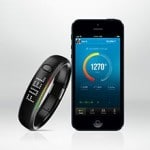
Imagine having your dietitian, personal trainer, GPS (in some cases), sleep therapist, and alarm clock with you 24/7. With devices like Lark’s LarkLife (http://www.lark.com/a>), or the Nike+ Fuelband (http://www.nike.com/ca/en_ca/lp/nikeplusfuelband) you can. Starting around $125 you get to wear a stylish wristband (how dare we call it a bracelet, as we may offend the occasional man), that digitally monitors many aspects of our lives.

Most of the bands work very similar and are based around an accelerometer and software on your computer, online or your smartphone; here is a quick rundown on the Nike Fuelband and LarkLife.

NIKE+ FUELBAND

The Nike+ Fuelband tracks your all-day activity to help you do more. Here is a quick overview of the Fuelband’s key features:

TRACK YOUR DAY: Through a sports-tested accelerometer, Nike+ FuelBand tracks your daily activity including running, walking, basketball, dancing – and dozens of everyday activities. It tracks each step taken and calories burned. It also tells the time of day [a neat feature].

SET A DAILY GOAL: Decide how active you want to be by setting a daily NikeFuel goal. The band’s LED display lights up from red to green showing your progress throughout the day.

SEE YOUR PROGRESS: Visualize your daily activity to see when you’re most active – and when you’re not. Nike+ helps you understand your activity patterns to help you do more. Progress is available online or via a smart phone such as the Apple iPhone.

STAY MOTIVATED: Receive achievements and rewards as you do more. Get on a streak, exceed your goal, and hit milestones along the way, and tell the world by sharing your activity and achievements through Facebook, Twitter and Path [interesting, I am not familiar with Path, will need to check it out!]

Overall, my impressions with Nike+ Fuelband are that it is catered more to active, physical fitness over every day personal life balance. That is where LarkLife takes over.

LARKLIFE

I have been interested in Lark for a while now when I first got wind of their Lark Pro – Personal Sleep Coach that silently wakes you through a vibrating alarm clock. The Pro version includes a sleep coach that monitors information like length of sleep, time, and patterns, to help improve your sleeping patterns. Lark has expanded its lineup to provide 24 hour life coaching with their LarkLife. Lark’s LarkLife is your all-in-one exercise, diet and sleep coach. LarkLife monitors your daily activity to help you: exercise smarter – Tap into your optimal exercise time and make your workout work for you; eat smarter – Get insight about what to eat and when, so you feel more energized and keep a healthy weight; sleep smarter – Improve your sleep and wake up more refreshed without bugging your sleeping partner; energize smarter – Pick up your productivity at work and at home with tips on how to focus and feel energized.

Some very cool features in the LarkLife include:

MOVE:

  • Step / Distance Tracking: At the end of the day, you’ll know how far you’ve gone, how sedentary you’ve been, how each day compares to the last, and how that compares to the average person, so you can make improvements the next day.
  • Exercise Logging: Easily keep track of the type of exercise, the amount of time you spent doing it, the distance you covered, the calories you burned and when you started and stopped. LarkLife is so smart, it can even tell if you went for a walk or run and will log it for you automatically, so you can compare activity and calories burned across different exercises.
  • Calories Burned: See how many calories you’re burning based on your activity each day. Since managing calorie use is important to maintaining focus, mood and productivity, LarkLife helps you modify your thinking and behaviour around being more active.
  • Fitness Alerts: Get a nudge to move if you’ve been inactive for a while. LarkLife makes it easier to stick to a fitness routine with alerts that help you stay on track, as well as find ways to squeeze more movement into your day.
  • Expert Fitness Coaching: Developed with top experts who coach pro athletes and business executives, LarkLife’s activity tips reinforce positive behaviours and help you to learn new ones to incorporate into your daily routine. By getting more consistent, effective activity each day, you’ll notice improvement in your energy levels and your health.

EAT:

  • ONE BUTTON DIET LOGGING: Log meals with the press of a button and pick the food group it belongs in. The simple diet logging helps you keep track of your meals and snacks to keep your energy up and work toward a healthy weight.
  • HYDRATION TRACKING: Easily track your daily water intake. With just one tap, you can log a serving of water. LarkLife helps you track the water you drink and reminds you to have a glass when it looks like you haven’t had enough, so you can get the most out of your exercise and your
  • MEAL ALERTS & REMINDERS: Easily track your daily water intake. With just one tap, you can log a serving of water. LarkLife helps you track the water you drink and reminds you to have a glass when it looks like you haven’t had enough, so you can get the most out of your exercise and your
  • EXPERT NUTRITION COACHING: Meal tips are designed by top nutrition experts. Learn about the super foods and eating habits that help you maintain a healthy weight and stay energized throughout the day. The smart accelerometer in the sensor tracks your daily activity level, which LarkLife translates into expert nutrition coaching for your optimal meal times and the types of foods you should eat.

SLEEP:

  • SLEEP TRACKING: At night, the smart accelerometer becomes a comfortable sleep sensor that determines your sleep duration and quality, as well as when you’re falling asleep, awake or tossing and turning. Getting good quality sleep is the foundation of energy and the key to maintaining focus during the day.
  • ACTIGRAPHY: Used widely by sleep clinics to track sleep quality based on activity, actigraphy tracks millions of micro-movements every minute, and then calculates exactly how long and how well you’ve slept. Developed with Stanford sleep specialist, Cheri Mah, LarkLife shows you the changes you can make to sleep better.
  • SILENT ALARM CLOCK: Dynamic vibration patterns gently nudge you awake while others around you sleep. Gentle vibration can reduce heart rate variability, stress levels and blood pressure spikes—all of which are known to cause that groggy feeling in the morning. Great for couples, roommates, the hard of hearing and deep sleepers.
  • SLEEP ALERTS AND REMINDERS: It can be hard to keep a consistent bedtime, no matter how good it is for you. Get recommendations for when to head to bed in order to sleep better and feel your best the next day.
  • SLEEP COACHING: Stanford sleep specialist, Cheri Mah, developed expert sleep tips to give you advice and encouragement that helps you stick to a consistent sleep schedule and a high quality of sleep. Discover the little triggers you may not have known about that make a big impact on how you sleep at night and how you feel the next day.

REFRESH:

  • Productivity Break: Timing breaks can help you get a fresh perspective and actually make you more productive when you get back to work. LarkLife recommends when and how to spend your break to get back feeling refreshed.
  • EXPERT PRODUCTIVITY COACHING: Refresh tips use expert-based guidance to help you to discover the things that add more energy to your day. Whether it’s a new hobby or a phone call with an old friend, LarkLife knows that energy and wellness come from more than just the physical. Increasing your productivity starts with feeling more refreshed.

SUMMARY

As both products rely extensively on supplementary software to provide your results, which affords both companies a huge advantage of being able to implement new and interesting features without the need for fancy hardware upgrades. Through a simple iPhone update or website enhancement, as examples, new features could be added to either device. Overall, both products look very cool; however as I need to spend my own money to test them out, it is still a tough call which I am going to buy. The Nike FuelBand looks cool, the LED screen is a very nice touch and almost had me sold with the “coolness” alone. However, Lark, and especially the sleep coaching has held my interest for a while.

Related reading: Google Glass – what to expect?

Google Glass – What to expect?

Once the exclusive domain of science fiction writers, glasses that allow you to display data, take photos and videos, translate real-time speech and even identify faces in a crowd have become a reality thanks to Google Glass. While rumours have been around for several years now, not many believed that this new piece of hardware would have found its way to developers quite so soon. Indeed, the first versions of Google Glass have already been purchased by developers at a cost of around $1,500 a pair. So what exactly can we expect from this new technology: a revolutionary step forward or a mere gimmick?

What is it?

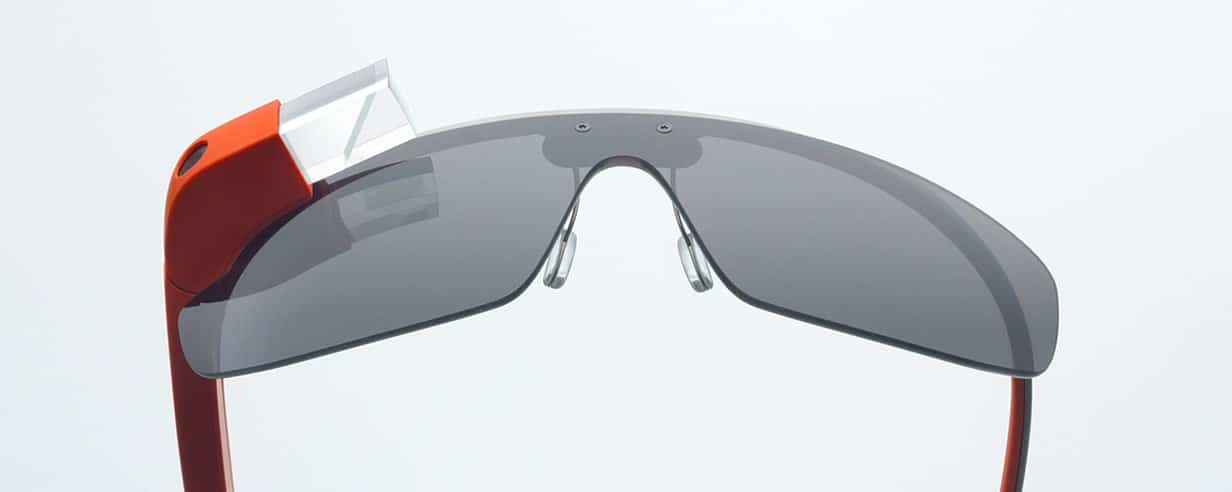
Google Glass is Google’s attempt to move data from traditional desktop computers and mobile devices to a prism screen that sits right at the end of your nose. Comprised of a display, touchpad, camera, battery and microphone, Google’s glasses will allow users to display data, take photographs and videos, and search while on the move.

How does it work?

Google Glass puts data into the upper right-hand corner of your field of vision using a prism screen. This placement is intended to be readable while not obstructing normal vision. The embedded microphone allows wearers to use voice commands to control what they see, with the side arm touchpad further facilitating navigation. Bone-induction technology, the presence of which has been confirmed, will also eliminate the need for headphones, as wearers will have sound transmitted directly to their ears through vibrations.

Google is also developing several other versions of the technology, for example by integrating prescription lenses into the design so that wearers of corrective glasses may also make use of the product. According to rumours mentioned in the New York Times article Google has been talking with some eyeglasses retailers and manufacturers, which appears logic: and a deal with the likes of industry giant Luxottica would definitely boost both companies’ market-share and assure Google’s new product a better look and alternative form of distribution.

What will it be used for?

Among the many potential uses of Google Glass is the possibility of translating or transcribing what is being said in real-time, potentially eliminating the need for minute taking and interpreting. Similarly, users can take real-time photographs or video footage of what they see from a first-person perspective; though this has prompted alarm from those who view this secret agent style filming technique as a potentially harmful breach of privacy.

Using the MyGlass app, users can also pair their glasses with their Android device, thus giving them the ability to read and reply to messages using the Google Glass voice-to-text software. If the glasses are paired with a GPS device, directions should become integrated with users’ vision such that following them becomes an intuitive process.

App developers have understandably grown excited about this new technology and are creating a myriad of new apps to complement it. From face recognition software and e-mail dictation technology to real-time flight information and newspaper headline apps, the sky really seems to be the limit.

When will it be on the market?

Though no official release date has been announced, some believe that Google Glass will be available to consumers by the end of 2013. Though the present cost to developers is around $1,500, the consumer version is expected to be cheaper.

Wearable screens were only one part of the conversation about connected devices. My article on smart devices as digital life coaches considered another use for the technology. Both posts capture the questions we were asking about these products in 2013.

Review: Larklife by Lark Technologies (My First Impressions)

Here is my review of my first impressions about my new LarkLife by Lark Technologies (www.lark.com) which is a new breed of Personal Life Coach that may help revolutionize our work-life balance; or so I hope. Excited to try this new technology, my pre-ordered LarkLife arrived in the mail earlier today by UPS. Although, originally promised by Christmas 2012 – in Lark’s defense, the shipping label was printed December 21st, and informed customers that had pre-ordered their newest product on December 23rd that “Due to a combination of manufacturing delays, high demand, and shipping snafus we are unable to deliver your order…”. That being said, it is here now, so time to give it a whirl.

For those that did not have a chance to read my post commenting on LarkLife and Nike+ Fuelband, here is a quick peek at what LarkLife can do.

LarkLife will track your activities during the day and your sleep quality at night while syncing your data automatically with your mobile device. During the day, LarkLife alerts you when you’ve achieved small wins – the little things in your day that make a positive impact on your health, energy and focus. Remember to check back into your LarkLife app throughout the day to see what you did!

Tony Caselli (tonycaselli.wordpress.com) commented on our blog a few weeks ago on his first insights into his new LarkLife. One point that Tony mentioned was that the larklife was ” a little larger than I’d expected, but not awkwardly large – it just doesn’t have the “cool jewelry” look of the Fuelband. I do like that it does more than the Fuelband, in terms of sleep and water and food tracking. It does have an led “meter” display, but I’d love it if could double as a watch also!”. My first impressions are that I have to agree, it is a little wider than I had anticipated from the original production pictures on Lark’s website, however as Tony commented, not awkwardly large. Overall it is about an inch wide on the front face and 3/4 of an inch on the bottom of the rigid band. Mine fits snugly (medium) – and may keep my eyes open on Lark’s website for a replacement band and see how a large may fit, although larger band may not fit as nicely under a dress shirt and my suit.

Documentation

My initial reaction was the lack of documentation included with the LarkLife was a little disappointing which was limited to how to setup and sync your band with your iSomething device. As examples, there is a small button that runs the length of the LarkLife sensor and a series of 8 LED lights along the top of the sensor, however I could not tell you exactly what either is for. Well I took a pause from my article after it occurred to me that the iOS LarkLife application had a few video tutorials as part of the setup. In Lark’s defense, my eager beaver self, downloaded and installed the app a few weeks ago and had completely forgot. In addition, I found a nice eight page manual on the LarkLife website at the following link:; http://support.lark.com/entries/21432948-lark-user-manual or the PDF can be downloaded directly here.

iOS App

The application is version 1.1 which shows the infancy of the application, at the same time, new and enhanced features have been introduced in the short life of LarkLife which first debuted in the iTunes store on November 13, 2012.  Some of the new features introduced to the application include:

  • New and improved tips, which appear as notifications if outside the app
  • Added Mood tagging features
  • Added syncing indicator for wristband in the blue circle
  • Performance improvements and bug fixes

Last night was my first night with the sleeping band, and was interesting to see its results — however a pause or “I need a glass of water” option would be helpful as my wander to the kitchen was counted as approximately 10 waking events. It was interesting to see that it took me only eight minutes to fall asleep — not bad for 1:45 in the morning following New Year’s festivities.

What Features Would I Like to See

  • Replacement bands so that you can order a larger or smaller size
  • Better integration of the Lark and Lark Pro features into the App – we can wear two devices so make my LarkLife compatible
  • Ability to add custom reminders in the application; for example, when to take a daily vitamin
  • More reminders and better recognition of your habits
  • Diet or calorie  intake

How Dare you BBQ Without Fire in the Kitchen Spice Co | Christmas 6-Pack

0

Ever since we received the Fire in the Kitchen Spice Co. Christmas 6-Pack of their incredible seasoning rubs, they have become a staple to our barbequing. It is time for a refill. These rubs are simply the most outstanding dry rubs on the market today. Chicken, pork, beef, veggies and fish never tasted so good!

The Christmas Pack is a great way to sample some of their fantastic seasonings. The Christmas 6-Pack includes:

Six speciality seasonings for grilling, oven roasting, baking, broiling, smoking, steaming and pan-frying

One Rub

***THE PERFECT SEASONING FOR OVEN ROASTED TURKEY***

Chicken, chicken wings, pork, ribs, steak, venison, pasta, soups, salads, sandwiches, vegetables, BBQ sauces, dips, eggs
Fire Rub An all-purpose seasoning with some heat Steak, roasts, chicken, pork, ribs, venison, soups, BBQ sauces, dips, eggs

JJ’s Veggie Blaze

The perfect seasoning for all vegetables Asparagus, peppers, onions, broccoli, corn, potatoes, carrots, salad dressing, infused veggie butter, chicken.

T-Bone’s Smoke Eater

A true garlic and hickory smoke seasoning Roasts, steaks, ribs, pork, chicken, shrimp, pizza.

Big Angry’s 3 Alarm

Seasoning with intense heat and explosive flavour Chicken, chicken wings, steak, pork, ribs.

Captain Bradley’s Ocean Rub

An amazing spice blend created specifically for seafood Salmon, white fish, scallops, shrimp.

How to Order

Call or e-mail to place your order before December 15, 2012.

Christian@fireinthekitchen.ca ~ 647-200-0530 ~ Will deliver in the GTA!

Individual seasonings available, $6 each, minimum order of 2 – Great stocking stuffers!


Fire in the Kitchen has come a long way since I wrote this post in 2012. Most notably, most of their great rubs can be found at your local supermarket. Visit the Fire In The Kitchen website to find a location near you. As a long time supporter of the brand, I continue to stand by my comments five years later.

Guest Post: The Best Computer Accessories for a Home Computer

When one buys a computer one often doesn’t take into consideration the fact that you will need other devises for your computer. When you buy a computer you just get the basics, sometimes in order to make the computer fit into your life you’ll need to make a few extra purchases of computer accessories from Dell.

Some computer accessories that you might consider are:

  • Speakers
  • A carry case
  • Mouse
  • Stand
  • Heat Shield
  • An extra battery
  • Earphones

These things will make it easier for you to use your laptop at its most optimum level. Let’s go over the reasons for these purchases one at a time.

If you are going to use your laptop for entertainment purposes, you should get some speakers. The speakers that come on the laptop are frequently inadequate for listening to music or videos.

You’ll need a carry case for a laptop even if you don’t frequently travel with your computer. If you can put it away after every use, you’ll decrease the amount dust and decrease the opportunities for damage to your computers.

The track pad on a computer is effective; however, they’re not as easy to use as a traditional mouse. You can get a wireless mouse for just a few dollars. They usually have a small USB that fits into the port of your computer, and then it works just like any other mouse. This is convenient especially for those who work on their laptops.

If you spend most of the time on your laptop with it on your lap, you’ll need a heat shield. Although laptops don’t get extremely hot, it can get uncomfortable after a long time.

You may want to purchase an extra battery. Laptop batteries these days can last for a very long time, however, if you’re planning on travel, an extra battery can keep you working even on long trips.

Earphones are a must in my opinion. I can’t tell you how often I’ve had to work away from home and had problems focusing because of the conversations of people around me or because of other things that are happening. Even at home, if I’m listening to music, it’s easier to ignore the phone. So if you’re planning on using the computer for work, I suggest getting a set of earphones.

Laptops are great for those who are working from home, or even if you are using it as a personal computer. There are some things that will make it easier for you to enjoy your laptop.

When you go to the store, do some research, ask for advice; let them know what you’re looking for and what you’re going to lose your laptop for. An associate will be able to tell you what you need to know about which accessories you’re going to need.

Related reading: Download and Technology Primer

Related reading: Should I move from a Windows PC to a Mac?